
We know parking bays come in all shapes and sizes, and that many of them deserve an independently designed string (with cross sections attached to the string to describe the kerb shape of the parking bay). For those parking/bus or widening bays that can be readily described with cross section edits, we’ve got you covered with this new variation.
Included in the Civil Site Design V26 release, the Insert – Add Parking Bay variation attaches a parking bay and dish to the invert of your kerb with the following controls:
- Set the width and height of the dish to add through the parking bay
- Set the dimensions of the parking bay – width, taper lengths and bay length
- Pick the type of tapers you want: linear, bay taper (⅓ curve, ⅓ tangent, ⅓ curve) or parabolic (back-to-back curves). Or, pick an alignment
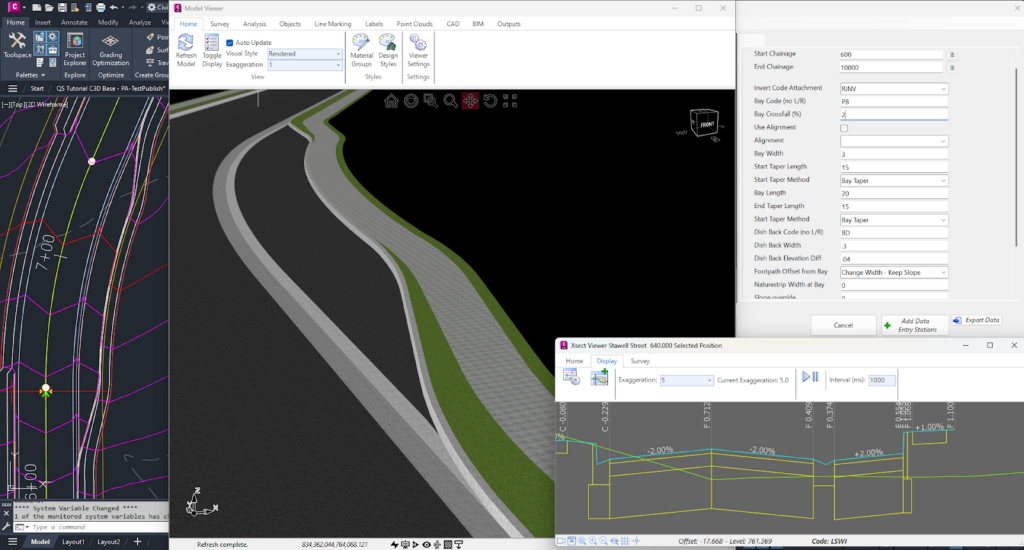
- Set the footpath (sidewalk) option from:
– Keep the original offset and either elevation or slope
– Transition offset to match back of parking bay
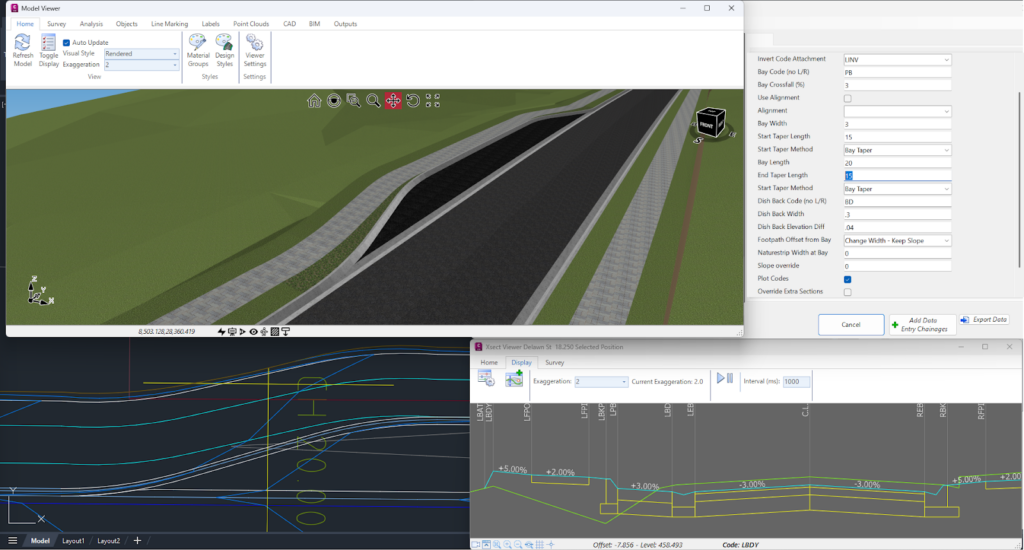
The software adds in extra sections to finely match up the start of the kerb to the dish back. Don’t forget to press the Recalculate button on the Design Data form to push those extra sections in.
The dish forms against the parking bay taper up until it reaches the width you input, so you get a smooth transition from kerb to dish and kerb.
This variation does assume a few things:
- You are adding a dish (you can put in zero for the width to simulate no dish) and attaching to the lip/invert of kerb
- The kerb consists of four codes (lip code, two codes between and a back of kerb code)
- The existing back of kerb code (eg: BK code) is removed and replaced with a code named BKP. We do this so that it is easier to manage the subgrade in a single template (if we keep the BK code, then the software assumes a ‘kerb’ type subgrade from the edge of road right through the parking bay to the back of kerb code)
- The parking bay taper begins at the Start Chainage you pick – you need to have an End Chainage that matches or is beyond the parking bay extents
If you are exploring the variations and hunting for the new parking bay variation, note that we’ve enabled a (completelyuser controlled) folder structure for grouping your variations (Read the Blog Article here). When you are looking in the Custom Variations list, you will find the Insert – Parking Bay with Dish variation in the Task_Specific_Variations folder (if you are in the USA, look in the Pavement folder).

Our friends at Watercom are having their best-ever EOFY Sale! Get up to 50% off new DRAINS licences, subscriptions, upgrades, Online Training & and In-Person Workshops! Licensing & Subscriptions 30% off new DRAINS Subscriptions 30% off new DRAINS USB Licences Up to 50% off upgrading existing USB Licences View Licensing Deals Training 50% off On-Demand […]

We are pleased to announce that a sister company to Civil Survey Solutions Pty Ltd has been formed called ‘Civil Survey Applications Pty Ltd’ to take the development and marketing of the Civil Site Design and Stringer Topo software to the next level.

With the release of V24 has come a number of new and improved features. Join us as we explore the major functionality update, Toolspace, which has been developed to enhance the user experience for operators at all levels.

With the release of V24 has come a number of new and improved features. Join us as we go through the new additions to Stringer and how they can help you streamline and improve your workflow.
